
Login & Access
XF777 Login and Registration Guide
Registration and login share one panel, and most sign-in problems are solved by switching between the password and code routes. Here is each one, plus a fix for every error.
XF777 puts registration and login on the same panel, with a toggle between them. Signing up takes a phone number and either a password or a one-time SMS code; you tick an 18+ agreement, and Google can be bound for quick access. Logging back in later needs your number and password, or the code route if the password is not working. Most sign-in problems here are solved by switching mode rather than resetting anything.
How XF777 Sign-In Works
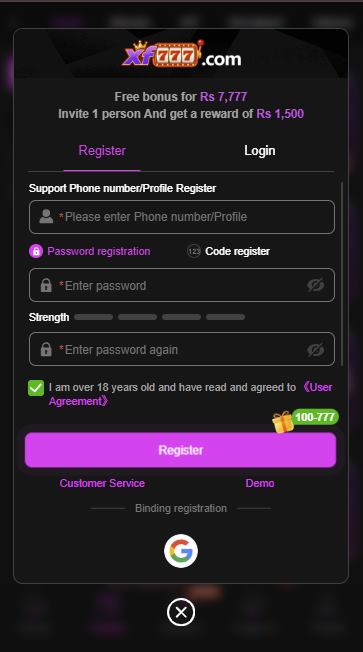
The top field accepts a phone number or profile. Below it, a toggle switches between Password registration (with a strength meter) and Code register (a one-time SMS code). The same panel carries a Register / Login switch at the top, an "I am over 18 and agree to the User Agreement" checkbox, a Customer Service link, a Demo option, and Google binding under "Binding registration".
| Route | What you need | Best for |
|---|---|---|
| Password | Your number plus the password you set | Everyday sign-in |
| One-time code | The SIM in the phone to receive an SMS | A forgotten password, or a new handset |
| Google binding | A Google account bound in your profile | A backup when the SIM is unavailable |
| Demo | Nothing at all | Looking around before you register |
How to Register
- Open XF777 and make sure the panel is on Register.
- Enter your phone number.
- Choose Password registration and set a password, or switch to Code register for a one-time SMS code.
- Tick the box confirming you are over 18 and agree to the User Agreement.
- Use your real name so it matches the JazzCash or Easypaisa wallet you will withdraw to later.
- Tap Register. The account is created immediately.
Bind Google while your account still works, not on the day you lose your SIM. Every recovery story that ends badly starts with someone having exactly one way in and then losing it.
Logging In
- Open XF777 and switch the panel to Login.
- Enter your registered number.
- Type your password, using the eye icon to check it — or switch to the code route.
- Tap Login. The lobby opens with your balance shown up top.
- Forgot the password? Use the reset flow, which sends a fresh code to your number.
Never type your XF777 code into a website, a chat or a phone call. The code proves it is you signing in. Anyone asking you to read it out is asking for your account, and no genuine staff member ever will.
Demo Mode
The panel carries a Demo link alongside Customer Service. It lets you see the lobby without an account, which makes it the cheapest way to judge whether the app is for you before you commit a number, a password or any money. If you are unsure, start there.
When Sign-In Breaks
| Symptom | Cause | Fix |
|---|---|---|
| Code never arrives | Weak signal, a VPN, or the SIM out of the phone | Turn off the VPN, check signal, restart the phone, wait a minute or two |
| Number rejected | Spaces or the wrong format | Enter the number exactly as registered, with no spaces |
| Password refused | Caps lock, a stale saved password, autocorrect | Reveal it with the eye icon, or switch to the code route |
| Locked after repeated attempts | The code button was tapped repeatedly | Close the app, wait about ten minutes, try once |
| App crashes on open | Outdated build or full storage | Update the APK, clear the cache, free some space |
| Connection error | Weak data or maintenance | Switch to Wi-Fi and retry in a few minutes |
| Signed in but cannot withdraw | Name mismatch or account not verified | Not a login fault — see the withdrawal guide |
If none of that works, use the in-app live chat rather than any account that messages you first. Do not trust WhatsApp or Facebook accounts claiming to be XF777 support.
Account Security Checklist
- Password unique to XF777
- Google bound as backup
- Account name matches your wallet
- Code never shared with anyone
- App installed from the official source
- One account per person
- App kept up to date
XF777 Login FAQs
Can I register on XF777 without a password?
Yes. Switch to Code register and sign up with a one-time SMS code instead of a password. You can add a password later from your profile.
My XF777 code is not arriving. What should I do?
Turn off any VPN, check you have signal and that the SIM is in the phone, then wait a minute or two before requesting again. Repeated fast requests trigger a short cooldown. If it still fails, use a bound Google account or contact in-app support.
How do I reset a forgotten XF777 password?
Use the reset flow on the login panel; it sends a fresh code to your registered number. Enter it, set a new password, and sign in.
Can I try XF777 without registering?
Yes. The Demo link on the sign-in panel opens the lobby without an account, so you can see the games before creating one.
Should I use my real name at registration?
Yes. Withdrawals generally require that your XF777 account name matches the name on your JazzCash or Easypaisa wallet, so a mismatch set at sign-up causes payout problems later.
Is there an XF777 login page on the web?
Sign-in happens inside the app. Treat any web page that asks for your XF777 verification code as a phishing attempt, however closely it copies the real design.
Not installed yet?
Get the XF777 APK, register with your phone number, and bind Google on day one as a backup.
Affiliate link • 18+ only • Real money, real risk.